|
First of all: As I said, I haven't actually touched FreeRIDE yet. This code
needs a lot of testing and peer review first. (And some of it needs simply
to be thrown away.)
What I've done instead is modify the fxscintilla_test program. This will naturally look very much like (the editor portion of) FreeRIDE. Since it is based on Scintilla also, there will be no code loss as a result of this. Here is a screenshot of the editor with a simple Ruby program loaded.
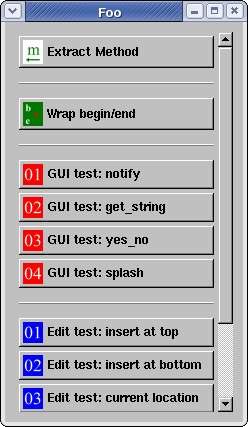
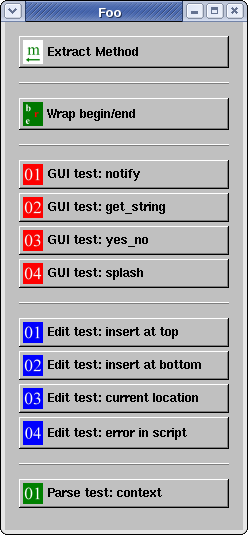
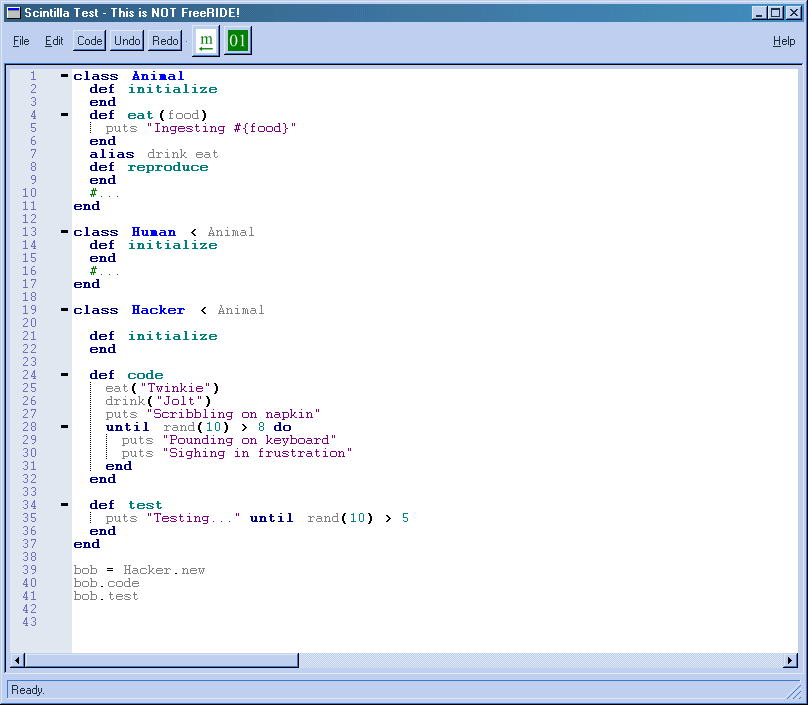 Looking at the loaded source code, you will note that Hacker inherits directly from Animal rather than from Human. It's just a joke. But it's OK, as bob is not doing test-driven design anyway. I added the Undo and Redo buttons simply for my own convenience. The Code button throws up what I call the "Code Pallette" — this is shown in the next two images, one with a scrollbar (as it will usually have) and one with the window enlarged so that (in this simple case) all the options will show at once.
I've added horizontal separators here to separate different parts of the pallette. Right now there's very little here except a few testing-related tidbits. Later on, there could be sections like refactoring, code-assist, and so on. The general idea behind the code pallette is that there are too many potential operations to let icons with tooltips suffice. The names of the refactorings are typically long descriptive names, hence the wide buttons I use here. I do favor putting an icon off to the righthand side, however. The text and the icon will thus become associated in the user's mind, making it more practical to put the same icons on the toolbar (as I have put two already, just for show). The red, blue, and green icons are only there for testing purposes and to take up space in the pallette. The only "real" item there is the first one, Extract Method. At the present time, the code pallette is populated from a file called pallette.dat in the ./data directory. This is strictly a temporary arrangement; it will change when integration with FreeRIDE happens. Each line of this file has the form: "Piece of descriptive text", "filename". A blank line gets translated into a horizontal separator. The file currently looks like this:
The descriptive text obviously goes onto the button. The file name is used for the .rb (script) file, and also for the .png image file. Thus the data directory contains an exmeth.rb file and an exmeth.png file. The script, of course, is the one that gets run when the button is pressed. Each script is wrapped in a method definition that is (practically speaking) anonymous. The fact that it's wrapped this way enables us to "jump out" of the script, as needed, with a simple return statement. However, since it's wrapped for us, we don't have to write a def and an end for the script. Here's the source of exmeth.rb:
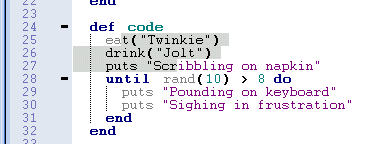
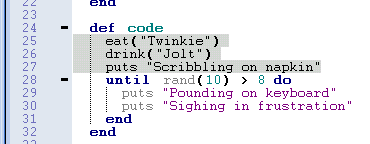
First of all, we check to see whether any text is selected. If there isn't any, we report an error and exit the script. If we fall through, there must be text selected. We then call the method extend_selection to make sure that whole lines are selected. This method simply moves the selection beginning to the beginning of that same line, and the endpoint to the end of the last line. This is only a convenience feature so that the user need not be careful to select only entire lines. See the "before" and "after" pictures here:
As I said, there should be a Selection class instead of this rather non-OO approach. This is high on my to-do list. We call code.context (where code is simply an attr_reader exposing a Parser object for our use). The context method returns an array telling us where in the code we are at the moment (class name and method name). Note that this is very primitive right now. It doesn't allow for nested classes, and it is certainly very easy to "confuse" this method into returning erroneous or meaningless results. But in this case, it returns ["Hacker","code"] as expected. (As someone once paraphrased Arthur C. Clarke: "Any sufficiently advanced technology is indistinguishable from a rigged demo.") Given the class name, we call class_range to return the range of lines covered by that class. (Again, this doesn't handle such issues as classes being repeatedly reopened.) We prompt the user for the name of the new method. The user types "design" as shown in this picture:
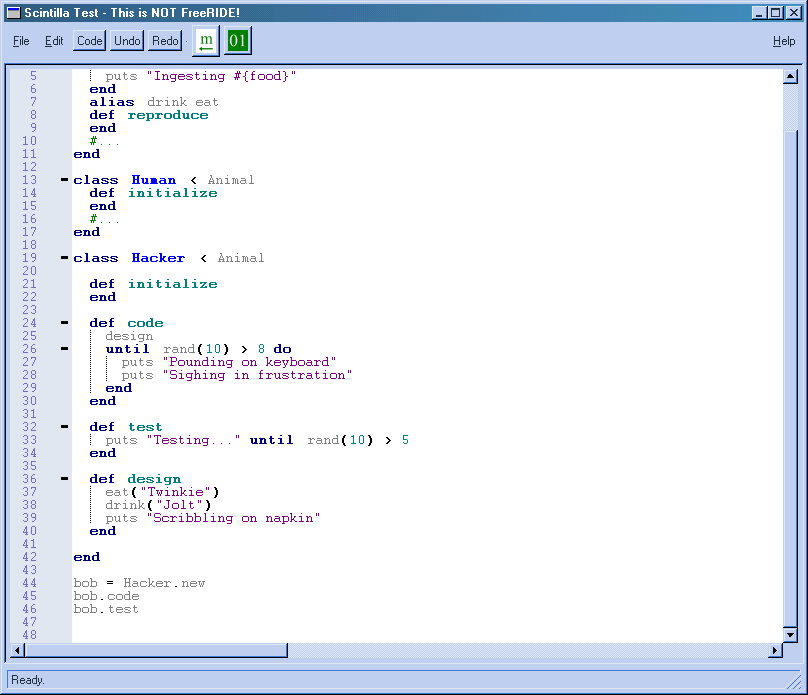
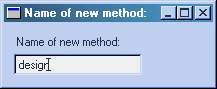 At this point the script does two more things. It goes to the bottom of the class definition and inserts the text for the new method; and then it re-selects the original set of lines so that it can replace that text with the method call. (Another issue not dealt with here is method parameters.) Now the script has completed, and this is the result:
 Actually, since the conference I have made things a little more OO. Here is what the script looks like now (the behavior is the same):
Note that in the newer version, there is an actual selection object on which we call methods such as those shown here: expand, text, range, mark, and replace). It's my intention to do the following in the future:
At that point, some other person can step up and provide a high-level API for the parser. I should mention that Curt Hibbs commented on my high-level approach, saying in effect that it should be even more high-level. We should have access to the Ruby source on the level of statements and expressions. Curt is correct, of course. But at the same time, I favor being able to access the exact line/character position of any piece of Ruby code, so that as a last resort, we can always edit it as pure text. As for actual refactoring, I also have these items on my to-do list:
Finally, there are some important issues involving integration with FreeRIDE itself that need to be addressed. These issues are very critical if any of this code is ever to be actually used in FreeRIDE.
And that, I suppose, wraps it up. If you have any comments or suggestions, you may email me, or better yet, visit the FreeRIDE project page on RubyForge. |